mail
phone_in_talk
computer
Sign In
Register

How to Use Our AI Helpdesk Assistant: Get Instant IT Support 24/7

What is an AI Helpdesk Assistant?

Our new AI Helpdesk Assistant is your 24/7 IT support companion. Instead of waiting on hold or sending emails, you can now get instant answers to common technology problems through our intelligent chatbot system. Think of it as having an IT expert available anytime you need help.

A man in a light blue shirt works at a desk with multiple monitors in a modern open-plan office.

Why Use Our AI Helpdesk Assistant?

How to Access the AI Helpdesk

Step 1:
Visit our support portal at www.cloudzion.com/helpdesk
Step 2:
Click on "AI Help Assistant" or the chat icon in the bottom right corner
Step 3:
Log in with your company credentials
Step 4:
Start chatting about your IT issue

How to Create a Support Ticket

If the chatbot can't solve your problem immediately, it will help you create a support ticket:

  • 1.  Describe your problem to the chatbot
  • 2. The AI will ask clarifying questions
  • 3. A ticket number will be generated automatically
  • 4. Our IT team will receive your request with all the details
  • 5. You'll get updates via email or we’ll call you.

Common Issues the AI Can Help You Fix

Example:

You:
"My printer isn't working" 

AI Help desk: “Can you tell me more about the problem?” 

You: “How can I fix the printer when it’s printing blank pages?” 
‍‍
AI Help desk:I can help with that. I’ll guide you through fixing the issue. First :
- Check the printer connection·
- Ensure the ink or toner sufficient
- Restart the printer and try again..."

You: “It’s working now. Thank you!”
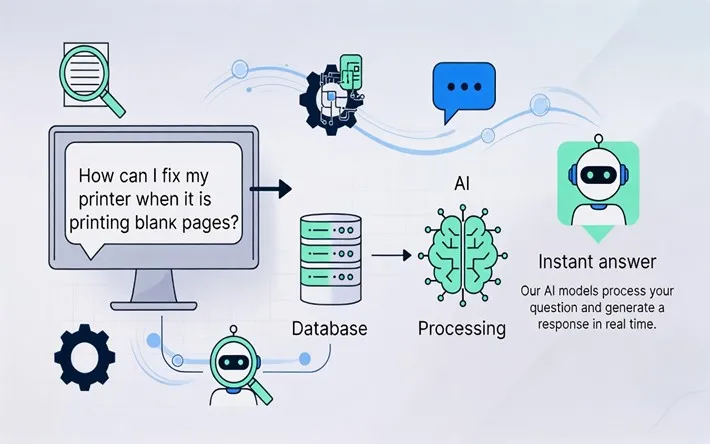
A diagram showing an AI model processing a user question from a computer screen to provide an instant answer.

1. Printer Problems

Problem: Printer Not Printing

When you tell the chatbot "My printer won't print," it willguide you through:

  • Checking if the printer is powered on and connected
  • Verifying paper and ink levels
  • Clearing the print queue
  • Reinstalling printer drivers
  • Removing paper jams step-by-step

Example Solution for Paper Jam:

AI Hekpdesk: "Let's fix that paper jam together:

  • Turn off your printer and unplug it
  • Open the front cover/access panel
  • Gently remove any visible paper (pull in the direction of paper path)
  • Check the rear access door for stuck paper
  • Remove the toner/ink cartridge and check underneath
  • Close all covers and plug the printer back in
  • Turn it on and try a test print

Did this resolve your issue?"

2. Computer Running Slow

The chatbot can diagnose why your computer is slow:

  • Check for too many startup programs
  • Identify high memory usage
  • Recommend disk cleanup
  • Suggest browser cache clearing

3. Can't Connect to Wi-Fi

Get instant troubleshooting for network issues:

  • Restart router instructions
  • Forget and reconnect to network
  • Check network settings
  • Verify credentials

4. Password Reset

Quickly reset passwords for:

  • Email accounts
  • System login
  • System login

5. Software Installation Issues

Get help with:

  • Installation errors
  • License activation
  • Compatibility problems
  • Update failures

Watch Demo

Tips for Getting the Best Help from the Chatbot

Be Specific:
Instead of "Computer broken," try "My computer shows a blue screen when I start it"
Include Details:
Mention error messages, when the problem started, and what you were doing
Follow Steps Carefully:
The AI provides step-by-step instructions - complete each one before moving forward
Be Patient:
Answer the chatbot's questions - they help diagnose your issue accurately

When Should You Still Call IT Support?

While our AI Help Desk handles most common issues, please call us directly for:

Benefits for Your Business

Save Time:
Resolve simple issues in minutes instead of waiting for callbacks
Work Anytime:
Get help outside business hours when you're working late
Better Documentation:
Every interaction is logged for future reference
Faster Escalation:
Complex issues are automatically routed to the right technician with full context

FAQ

Get Started Today

Ready to experience faster IT support? Visitour help desk portal and start chatting with our AI assistant. For most common issues, you'll have a solution in under 5 minutes.

Access the AI Helpdesk

Have questions about using the AI Help Desk? Leave a comment below or contact our support team.
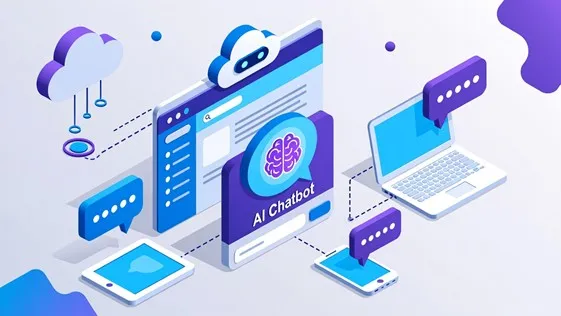
An isometric illustration showing an "AI Chatbot" interface connected to various devices, cloud storage, and speech bubbles.
IT support for a West Midlands steel cutting company - Cloud Zion Testimonials ➜ IT Company ➜ Managed Service Provider ➜ CloudZion Cookie policy - Cloud Zion
Phone Glazed Windows
Contact Us
support
Helpdesk
ai chatbot icon
AI ASSISTANT

close

ai chatbot icon

👋Welcome! I’m your AI assistant.
Need help? Just type your message and I’ll assist you or ask to be connected with a human agent.

Ask me or select an option:

💬 Chat for Quick Fix
🎫 Log a Ticket
📚 Knowledge Base
🚀 Onboarding

Cloud Zion uses the information you provide to us to contact you about our relevant content, products, and services. Check out our privacy policy here.

close
attach_file mic
Thank you! Your submission has been received!
Oops! Something went wrong while submitting the form.
AI-generated content may be inaccurate.
close
ai chatbot icon
👋 Have questions about
Cloud Zion? I'm an AI Assistant
that's here to help!
Chat icon glazed windos

close

WhatsApp icon